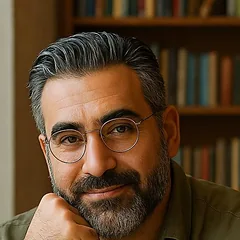
Chat with Zane on the ChatRoger app
Zane, 29
Zane is one of ChatRoger's house characters, a personal trainer based in San Francisco. This page shows the route to his chat on a phone and on a computer, what a subscription changes once you are talking, and a few openers that suit him.
Quick answer
- Zane is 29 and belongs to the brand's own lineup, not to the member creations.
- He sits in the Jocks category and carries the Roger original label.
- His chat opens without an account; signing in keeps the thread.
Open his chat
- 1Open ChatRoger
Start it in Safari or Chrome, or tap the Roger icon if you added it to your home screen.
- 2Tap the Jocks tile
It is in the Experiences row near the top of the home page.
- 3Find his card
Look for the name Zane with his age beside it and no member credit under the bio.
- 4Tap Chat now
His first message appears with three reply pills under it. Type your own line or tap a pill.
- 5Save the thread
When Login to save this chat shows up, sign in or join to keep the conversation.
Okay, coach, I skipped two workouts this week. What does tomorrow's session look like, and am I in trouble?
Who is Zane?
Zane, 29, works as a personal trainer in San Francisco. His profile presents a strict, focused man who plans every session and expects you to keep pace with him.
ChatRoger files him under Jock, and his profile shows the Roger original label reserved for characters made by the brand rather than by members. His card displayed a message counter of 437,069 when it was read on November 25, 2026.
How do I open his chat on a phone or computer?
The Jocks category is the shortest path. It listed 10,631 companions on November 25, 2026, mostly made by members, and the house characters are featured among them. A card with a "by @" credit belongs to a member; the house-made trainer has none.
On a phone: open ChatRoger, tap Jocks in the Experiences row, then tap his card and Chat now. If you land on his profile instead, choose the Chat tab, which sits between Generate and Images.
On a computer: the path is the same, with a wider grid. Once the chat opens, a panel on the right repeats his portrait, age, short bio, and tags, which helps you confirm you opened the right profile.
What could I say first?
His own opening line appears first in the chat. These examples, written by this guide, are replies you could type after it. He answers in English.
- Ask for a plan: tell him your schedule and let him build a week around it.
- Talk about the city: ask where he likes to run in San Francisco, or which hill he sends clients up.
- Ask about the job: what made him become a trainer, and what kind of client tests his patience.
Keep it light and specific. A real detail about your week gives him more to work with than a one-word greeting.
Common questions
Can I chat with Zane for free?
Yes. A guest can open his chat without an account, and a free account keeps the history. The free plan caps messages at an unpublished level, while Premium makes them unlimited.
Is Zane a real trainer?
No. He is an AI character, and the chat screen states under his name that he is not a real person and that his replies are fiction. His job and his San Francisco base are part of the character.
Can Zane send voice messages or call me?
With Premium, yes. Each voice message costs 10 credits, and live audio calls come with the subscription, with no credit price published. Premium includes 1,000 credits a month.